

Product manufacturers such as yourself know how important Revit families are. It’s important you don’t avoid the family editor and tap into one of the most convincing features in the Revit bundle.
In product design, using Revit families for manufacturers opens the doors to reusability. Revit families, which are essentially groups of parametric building blocks representing real-world components like doors, boilers, chairs, etc., help standardize elements in the 3D model.
As a product manufacturer, you can integrate digital models into the BIM framework. Being ready-to-use, these assets facilitate accurate geometry and technical specifications. These BIM-ready assets ensure your products are impact-driven when they are actually manufactured and used.
When 3D geometry is accurate and metadata is complete, it ensures accuracy based on real dimensions. Numerous product manufacturers have said it facilitates multi-disciplinary information exchange.
It also helps our Revit modeling teams automate repetitive tasks. If you are looking at greater product efficiency, it’s with Revit families.
How Revit families simplify 3D modeling and reduce errors
When the components are smart and reusable, it makes 3D modeling simple and fast.
Manufacturers can set up families for their products
As a manufacturer, you have the capacity to leverage Revit families for products using nested metadata and parametric constraints. When physical and performance features are precise, they ensure BIM integration is seamless. It also helps you with effective lifecycle management.
Eliminate design errors and coordination issues
This is simple to comprehend as Revit families can trash out manual drafting issues faster. When geometric constraints are taken into account and metadata is integrated, it shortens modeling time. Cross-disciplinary coordination maintains technical fidelity across Revit workflows.
Maintain Consistency Across All Product Variations
If you are a part of a leading product manufacturing company, then consistency has to be maintained. Make it your stronghold with parametric data and cross-trade alignment. Avoid geometric deviations across views and kindle BIM schedule integration.
Why Revit families matter for manufacturers
Manufacturers can’t avoid Revit families because of accuracy and metadata along with BIM specifications.
Families let manufacturers display their products in projects
As a product manufacturer, you have the capability to showcase products using high-end 3D geometry. If its an architect or engineer, they can visualize, download, and specify the required products directly in their 3D BIM model.
Common manufacturer products in Revit families
We can break this down into a series of loadable products like windows, doors, fixtures, furniture, and HVAC equipment. These digital BIM assets include technical specifications and required performance data.
Revit modeling that saves time and removes mistakes
When geometry within families is automated, it shrinks errors and timelines.
Revit modeling for product manufacturers
As a Revit modeler, you can help product manufacturers standardize metadata and use parametric constraints. This backs them up with computational validation for mechanical tolerances and performance coefficients. It also ensures there is no coordination failure for downstream processes.
Accurate models prevent design and construction errors
When constraints from the real-world are embedded into Revit families, it ensures you don’t run into errors. Automated clash detection throws out conflicts. But, validation is achieved with validation of dimensions, MEP connectors, and clearances during the design phase.
3D modeling supports correct sizing, placement, and function
If you are frequent Revit user, you would know 3D modeling with this tool ensures the right sizing and placement through parametric constraints. When data is already injected in Revit libraries it supports components with faster adaptation to dimensions and maintains functional use.
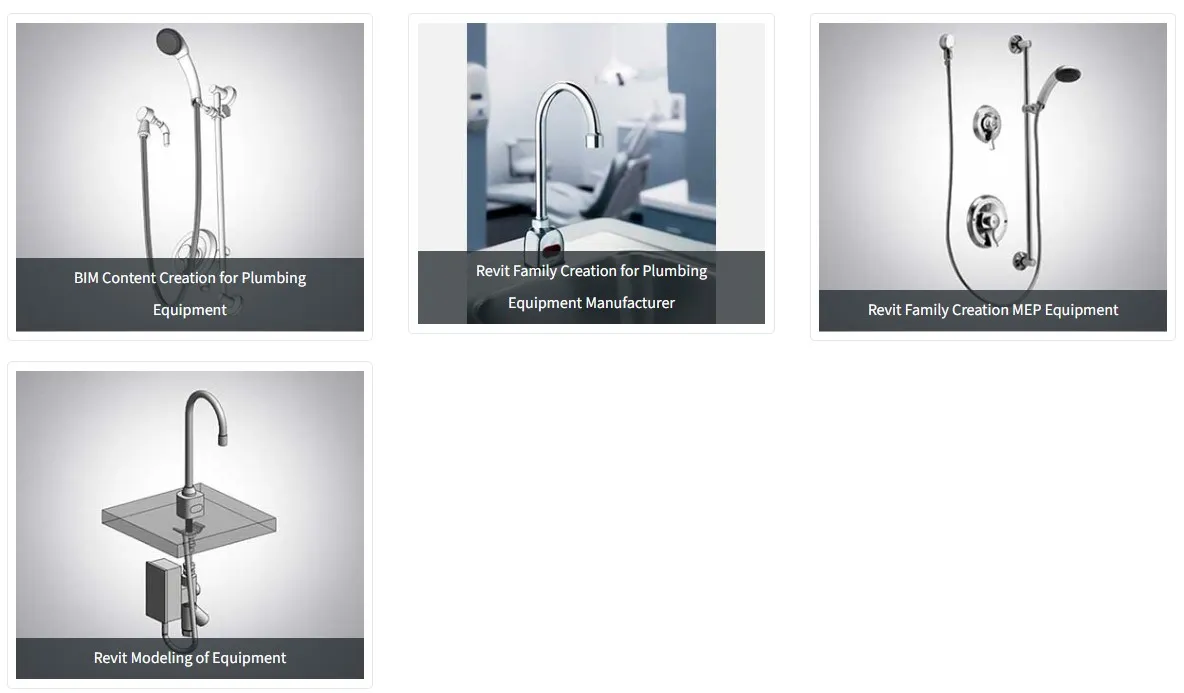
Case Study: Manufacturer-specific Revit family creation for plumbing products
We place the impact of Revit families center-stage with a case study
Challenge
A plumbing products manufacturer wanted Revit plumbing families as per Autodesk Seek standards.
Solution
We created 150+ pre-built, metadata-ready plumbing libraries.
Results
Coordination improvements.
Reduction in 3D modeling time.
Cut-down on rework.
Better project efficiency.
Read the entire case study to know how »
Images are shown here:
Using Parametric Revit families to fit any design
As a Revit modeler, you can include dynamic constraints to automate dimensional adjustment.
Adjustable parameters like size, color, or finish help designers
When parameters are adjusted, it helps product manufacturers fit into custom design needs perfectly. As a product designer, you can instantly modify parameters like size, color, or finish to ensure aesthetic consistency and specifications. You don’t have to create separate models.
Example of a parametric product
Let’s take an office chair into consideration as it is a common parametric element. Designers can employ parameters to modify armrest position, height, and fabric finishes. This can help you meet ergonomic needs.
Organizing Revit content for quick access
As a product designer, you can access Revit content quickly based on standardized naming and common BIM libraries.
Revit content as all families and objects stored for projects
In 2025, the Revit content library is a centralized space where you can store BIM-ready Revit libraries. If you are an architect, you can leverage features like instant browsing, selection, and loading of standardized elements.
Benefits of organized content for designers and contractors
As a designer or contractor, you can reap the benefits of organized Revit content in your 3D model. Let’s list them in the following order:
Refined specifications
Greater accuracy
Conflict removal
Faster collaboration
Consistent data
Easy access saves time and reduces errors
When you have complete and centralized access to your Revit BIM libraries, it eliminates manual modeling needs. Parametric data within the elements clips errors by ensuring exact technical specifications of the manufacturer are integrated in the entire design.
BIM objects that make projects more accurate
When BIM objects are integrated with accurate manufacturer data, it ensures functional and geometric precision.
BIM objects and their role in project planning
BIM elements act like smart data transmitters, which helps manufacturers include accurate specifications and performance metrics. It supports preconstruction planning and procurement of manufacturing materials.
Good objects improve coordination across teams
If you’ve created high-quality Revit families, it can improve coordination based on customized technical data. When cross-disciplinary alignment is perfect, it demolishes design conflicts between architects, contractors, and manufacturers.
Compatible with multiple BIM tools
When Revit libraries are exported as IFC files, it ensures you have cross-platform compatibility. It helps you integrate your data into numerous BIM tools.
Building BIM libraries into Revit to showcase products
When BIM libraries are integrated into Revit, it help you as a product manufacturer to show products that are precise and specification ready.
Advantages like better visibility and faster selection in projects
Revit families offer exceptional visibility in 3D space and organized parameters. This can help you select components faster and realize accurate spatial coordination for complex projects.
Libraries increase product adoption by designers
As Revit families provide customized and data-rich elements, it enhances project visualization and makes product selection better. It also ensures coordination and documentation within architectural disciplines.
Conclusion
Revit families that lean toward manufacturing are important BIM deliverables. They close the gap between digital design and physical manufacturing. Presently, they make multi-disciplinary coordination and specifications seamless. Moving ahead, as manufacturers you can use AI and IoT ready assets for digital twins and smart buildings.